Complete Feature Guide
Claude Code Features: Beginner to Advanced
Features 1-pagerClaude Code is a tool that lets you talk to your codebase by typing simple commands into your terminal. Instead of clicking around in an editor, you have a conversation. The terminal becomes the bridge between your instructions and your entire repository.
When you type a command inside Claude Code, it's as if you're saying: "Claude, step into my project… let's build things."
Claude Code Beginner Features
Claude Code makes everyday coding tasks accessible to anyone. Whether you're exploring a new codebase, planning a feature, writing or editing code, or checking your work, you can simply explain your goal and let it help.
These core features help you understand, plan, build, and maintain your codebase. Master these foundational workflows before diving into advanced customization.
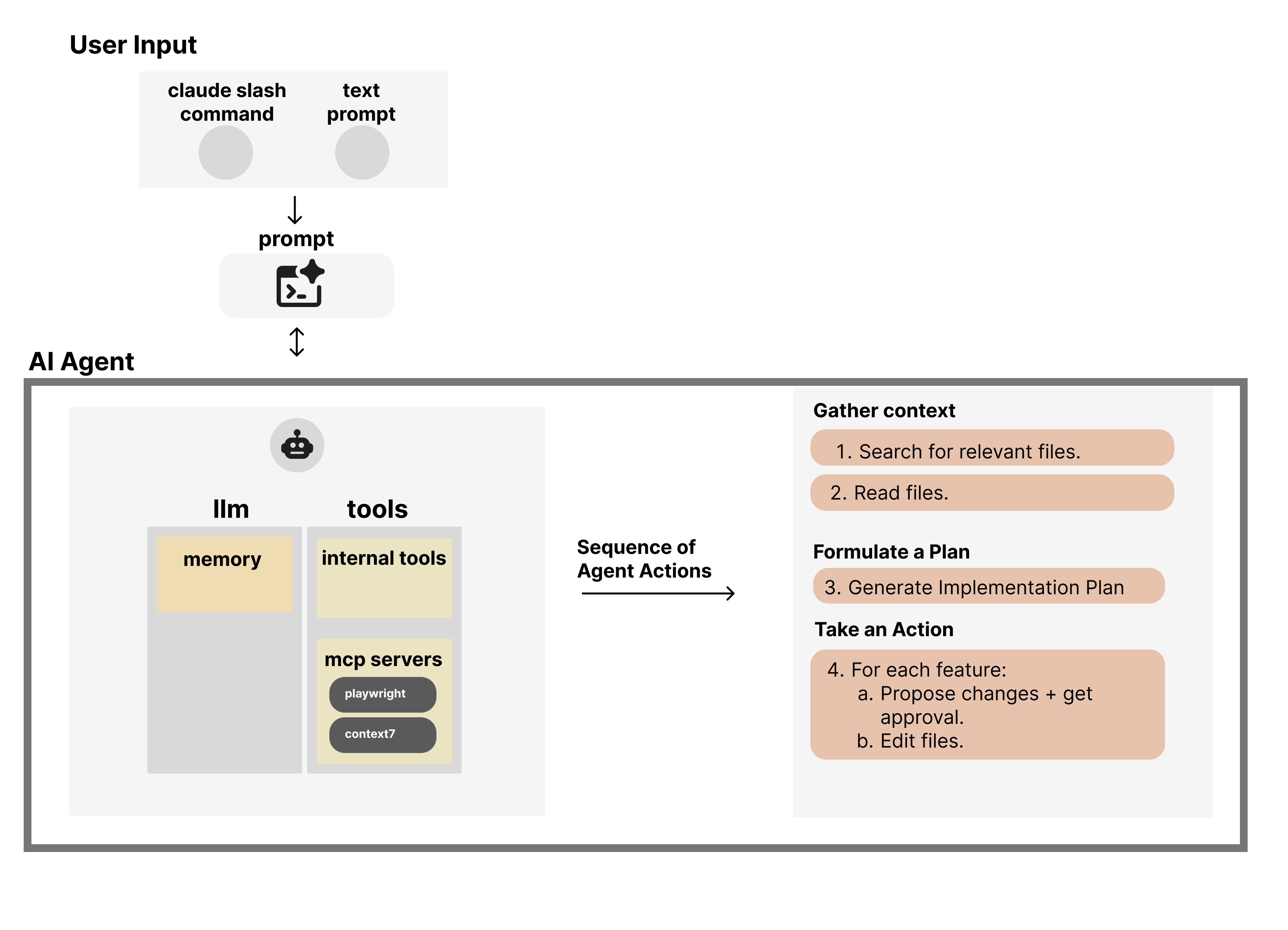

Understand or Search Your Codebase
Claude explains your project structure, files, and functions so you can quickly get oriented in any repo. Write documentation too!
Plan What to Build
You can outline features, architecture, and edge cases in natural language, and Claude turns them into clear technical steps.

Write, Modify, and Refactor Code
Claude generates new code, updates existing files, and iterates with you until the feature works.

Fix Bugs and Decode Errors
Paste in stack traces or test failures, and Claude will explain what they mean and walk you toward a fix.

Generate Tests
Write unit tests, integration tests, or test scaffolding to ensure your code is reliable and maintainable.

Automated Code Reviews
Claude reviews your changes, catches issues, suggests improvements, and explains the 'why' behind each recommendation.
Claude Code Advanced Features
Claude Code becomes much more powerful when you start customizing it by using the advanced features. You can teach your agent new skills, tune how it works, and streamline the workflows you use all the time. There's a learning curve, but it's the kind that pays you back every day you code.
These advanced features let you customize Claude Code's behavior, automate workflows, and integrate with external tools and services.
Claude.md
Teach Claude your project's 'house rules' once so it behaves consistently on every run.
💡 What is it?
A configuration file that lives in your project root and gets loaded automatically every time you start Claude Code. Think of it as your project's instruction manual—it tells Claude about your tech stack, coding conventions, important files to protect, and common pitfalls to avoid. Write it once, and Claude follows those rules on every run.
Why This Matters
- ●Keep it essential—this file loads on every run and costs tokens, so put deeper knowledge into skills, hooks, or custom commands.
- ●Use it to protect critical APIs, schemas, and read-only files that Claude must never break without asking.
- ●It's the right place to teach it your habits and guardrails once, instead of repeating them in every prompt.
Quick Facts
LOADED ON EVERY RUN
Defaults, guardrails, and no-touch rules.
WHAT BELONGS IN claude.md
Project snapshot, run/test commands, language & framework conventions, API/schema rules that must not break, no-touch areas & common mistakes, pointers to skills/hooks/commands.
Diagram placeholder: show how claude.md feeds context into Claude Code on every run
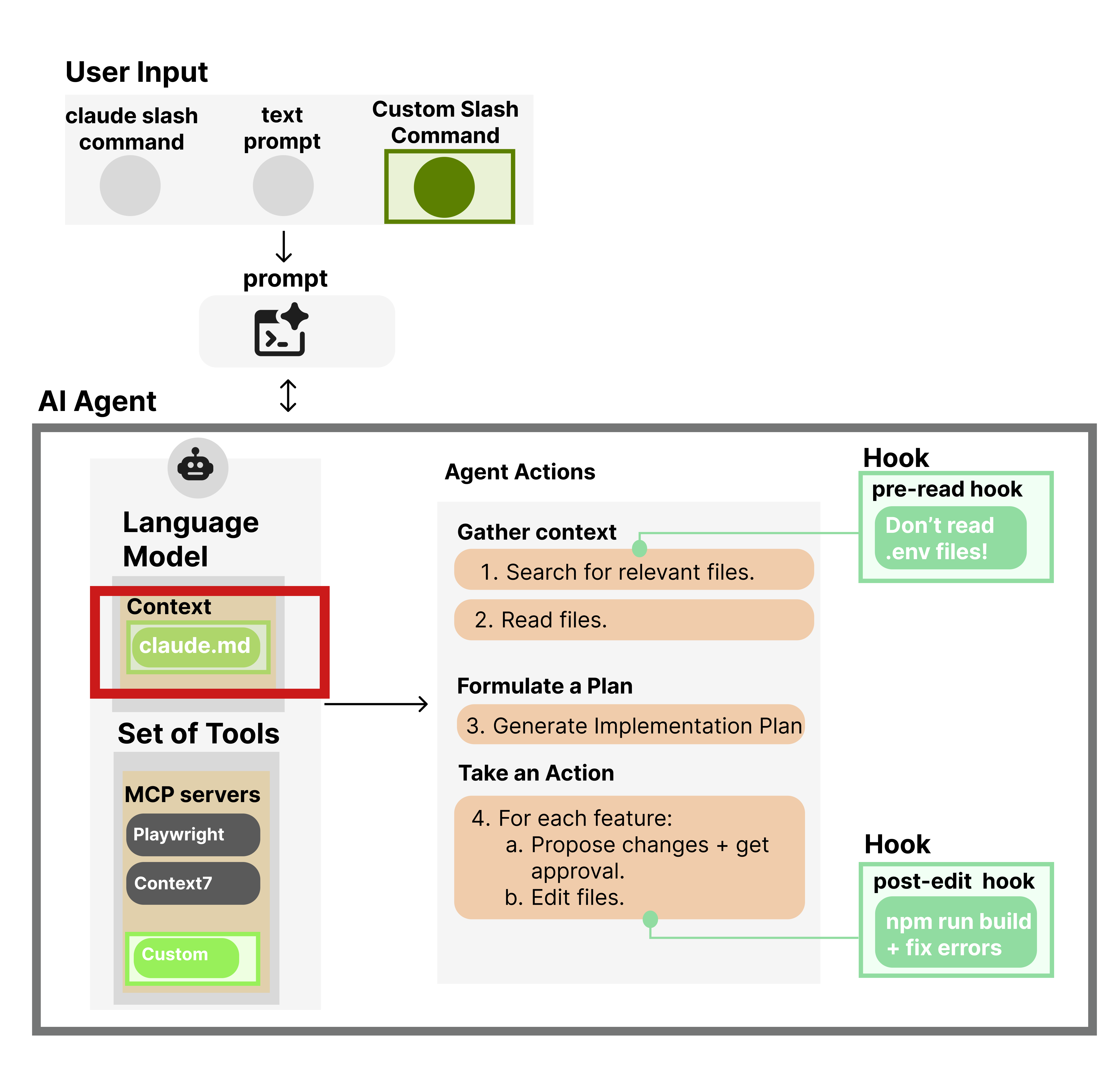
What Belongs in claude.md
| Command | Description |
|---|---|
| Project snapshot | Brief project overview + tech stack |
| Run/test commands | Standard dev, test, and migration commands |
| Language & framework conventions | Core style rules to always enforce |
| API/schema rules that must not break | Critical structures Claude can't change |
| No-touch areas & common mistakes | Read-only files + mistakes to avoid |
| Pointers to skills/hooks/commands | Directives to use skills/hooks for complex tasks |
Example claude.md Files
| Example | Target / vibe |
|---|---|
| ArthurClune/claude-md-examples (python2-CLAUDE.md) | Python (example collection) |
| pydantic/pydantic-ai (CLAUDE.md) | Python (framework / library) |
| mongodb/chatbot (CLAUDE.md) | Platform/app repo (RAG/chatbot) |
| andgineer/fastapi-celery (CLAUDE.md) | FastAPI + Celery backend template |